Recommendation
Best Wedding Seating Plan Tools for Couples and Planners in 2026
We compare the best wedding seating plan tools for couples and professional planners, from simple drag-and-drop charts to AI-assisted seating and complete venue floor plans.
It rarely feels difficult at the beginning
Creating a wedding seating plan rarely feels difficult at the beginning.
You create some tables, add your guests and start placing people together. Then you remember that two relatives are no longer speaking, one guest needs to sit near an accessible exit, several people only speak Spanish and a couple has cancelled after you completed the entire arrangement.
This is where a wedding seating plan tool becomes useful.
The best tools do more than place names around circles. They help you manage guests, understand table capacity, make last-minute changes and produce a plan that your venue and catering team can actually use.
We compared some of the most useful wedding seating solutions available in 2026, from basic free tools to more advanced systems for complex weddings.
Quick comparison
Quick comparison
| Comparison | Best for | Main strength | Main limitation |
|---|---|---|---|
| The Wedy | Complex weddings and planners | Relationships, constraints and AI-assisted seating | Part of a paid wedding-planning suite |
| Wedding Planning Assistant | Couples wanting a free online tool | Accessible visual drag-and-drop planning | Less focused on complex guest relationships |
| PerfectTablePlan | Professional and offline planning | Powerful automatic assignment and detailed exports | Desktop-based interface |
| Wedding Studio | Simple plans without immediate signup | Fast, free visual layout creation | Better suited to straightforward weddings |
| Canva | Designing the final seating-chart sign | Strong visual templates | Not designed to solve guest placement |
| Seat Puzzle | Planners managing visual event layouts | Mobile-friendly venue and seating mockups | Broader event tool rather than wedding-specific workflow |
1. The Wedy
Best for: Complex guest lists and relationship-aware seating
The Wedy is designed for couples and wedding planners who need to manage more than table shapes and guest names. Alongside its guest-management system, it allows users to record relationships and seating requirements such as:
- Guests who must sit together
- Guests who should preferably sit together
- Guests who should not share a table
- Couples and family groups
- Language preferences
- Accessibility requirements
- VIP placement
- Proximity to exits or the couple
- Locked table and seat assignments
Guests can then be dragged between tables manually or arranged using an AI-assisted seating planner.
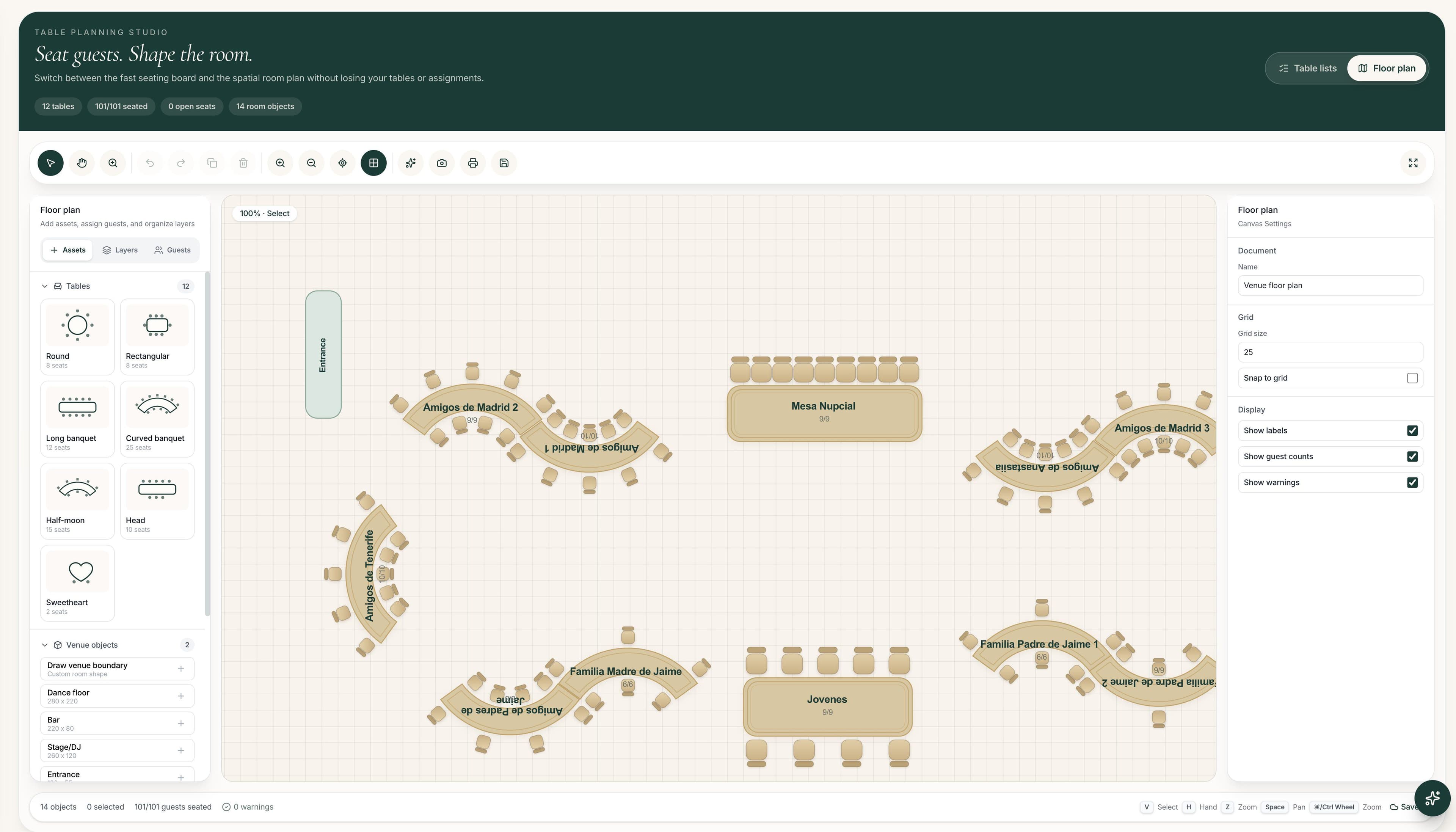
The platform also includes a visual floor-plan editor, allowing users to position tables, entrances, dance floors, bars, stages and other venue elements. Tables in the floor plan can be connected to the actual guest seating arrangement.
This makes The Wedy particularly useful when the seating problem involves both social relationships and physical venue constraints.
What we like
- Relationship-aware guest organisation
- Must-sit and avoid-sitting rules
- AI-assisted seating suggestions
- Drag-and-drop table management
- Individual seat assignments
- Visual venue floor plans
- Guest RSVP and dietary information in the same system
- Public table lookup that can be shared by link or QR code
- Tools for both couples and professional planners
What to consider
- The seating and floor-plan tools are included in The Wedy’s Wedding Planning Suite rather than being offered as a standalone free chart maker. The suite currently costs €349 as a one-time payment per wedding and supports up to 300 guests.
Verdict
The Wedy is the strongest option in this comparison for weddings where family relationships, guest groups, accessibility needs and last-minute changes make seating genuinely complicated.
Best choice for: Couples with complex guest lists and planners who want guest management, seating and floor planning connected in one workspace.
2. Wedding Planning Assistant
Best for: Creating a free visual seating chart online
Wedding Planning Assistant offers an online seating-chart tool that lets couples arrange tables and guests visually. The tool supports drag-and-drop planning and helps users understand where tables sit in relation to the rest of the reception space. It is also connected to a broader collection of wedding-planning tools, including guest lists, RSVPs, timelines and wedding websites.
What we like
- Free to begin using
- Visual drag-and-drop interface
- Guest-list integration
- Broader wedding-planning tools
- Useful for understanding the room layout
- Can be used without initially creating an account
What to consider
- It is primarily a visual seating and floor-layout solution. Couples managing complicated family dynamics may still need to track relationship rules and sensitive seating decisions separately.
Verdict
A good starting point for couples who want a free and accessible way to move beyond spreadsheets.
Best choice for: Straightforward weddings where the main challenge is placing tables and assigning guests visually.
3. PerfectTablePlan
Best for: Detailed offline seating and professional exports
PerfectTablePlan is downloadable software for Windows and macOS. Unlike most browser-based wedding tools, it can be used without an internet connection. It supports drag-and-drop seating, table shapes, scaled floor plans, spreadsheet imports and automatic guest assignment. Users can specify guests who should sit together or apart and generate materials including seating charts, place cards and supplier reports. The software is sold through a one-time licence, with pricing starting at $29.95 plus tax per user at the time of review.
What we like
- Works offline
- Automatic seat assignment
- Sit-together and sit-apart preferences
- Scaled floor plans
- Excel and spreadsheet imports
- Detailed printing and export options
- Suitable for large events
- One-time purchase rather than a subscription
What to consider
- Its desktop-software experience may feel less modern than browser-based wedding platforms. Collaboration can also be less immediate when several people need to edit the plan remotely.
Verdict
A powerful option for planners and technically confident couples who prioritise control, printing and detailed event reports.
Best choice for: Professional planners, large events and users who prefer offline desktop software.
4. Wedding Studio
Best for: Quickly creating a simple seating layout
Wedding Studio provides a free drag-and-drop seating-chart maker with predefined venue templates. Users can import a guest list from a spreadsheet, arrange tables and assign guests. No signup is required to start building, although an account is needed to save the plan across devices or export it.
What we like
- No signup required to begin
- Free visual planning
- Spreadsheet guest import
- Several venue templates
- Simple drag-and-drop interface
- Low barrier to getting started
What to consider
- The available templates and workflow are better suited to conventional reception layouts. Weddings with unusual venues, complex relationships or detailed planning requirements may need a more advanced system.
Verdict
A convenient tool for quickly testing a basic reception arrangement.
Best choice for: Smaller or simpler weddings where speed matters more than advanced seating logic.
5. Canva
Best for: Designing the seating-chart display
Canva offers templates for producing polished wedding seating charts that can be printed or displayed at the venue. However, it is important to understand the difference between planning the seating arrangement and designing the sign guests will see. Canva is excellent once you already know where everybody is sitting. It is not designed to manage RSVPs, relationships, table capacities or the consequences of moving guests between tables.
What we like
- Large range of visual templates
- Easy typography and colour customisation
- Suitable for printed and digital signage
- Familiar interface
- Useful for matching the wedding’s visual identity
What to consider
- Guest placement must normally be solved elsewhere. Every late seating change may also need to be updated manually in the final design.
Verdict
Use Canva for presentation, not for solving the seating-plan problem.
Best choice for: Couples who have completed their seating arrangement and now need an attractive entrance sign.
6. Seat Puzzle
Best for: Mobile event-layout planning
Seat Puzzle is an event-planning application that helps users create venue layouts, manage guest lists and track RSVPs. It supports custom floor-plan shapes and is positioned for both private events and professionals managing multiple clients.
What we like
- Designed for mobile use
- Custom venue shapes
- Guest-list and RSVP features
- Useful for different types of events
- Appropriate for professional client work
What to consider
- Because it supports many event types, the experience is less specifically built around wedding relationships, invitations and the complete wedding-planning journey.
Verdict
A useful choice for planners who frequently work from a phone or tablet and need flexible visual event layouts.
Best choice for: Mobile-first event professionals and planners working across different event categories.
How to choose the right wedding seating tool
Choose a basic visual tool when:
- Your guest list is relatively small
- Most guests already know each other
- You only need to assign people to tables
- Your venue uses a conventional layout
- You do not expect many last-minute changes
Wedding Planning Assistant or Wedding Studio may be sufficient.
Choose professional layout software when:
- You need scaled plans
- You work offline
- You manage very large events
- You need detailed printing and supplier reports
- You want automatic seat assignment
PerfectTablePlan is particularly strong in this category.
Choose a relationship-aware system when:
- There are divorced or separated relatives
- Some guests should not sit together
- Several languages are involved
- You need to consider accessibility
- Couples and family groups must remain together
- You expect frequent RSVP changes
- You want to connect the seating plan with the venue layout
This is where The Wedy offers the clearest advantage.
Choose a design tool when:
- The seating arrangement is already final
- You only need the entrance display
- Visual styling is your main concern
Canva is the most appropriate option for this final stage.
Our recommendation
For a small wedding with a straightforward guest list, a free drag-and-drop tool may be all you need.
For professional events requiring detailed offline control and printed outputs, PerfectTablePlan remains a capable specialist solution.
For weddings where the real difficulty is deciding who should sit with whom, The Wedy is the most complete option. It combines guest relationships, seating constraints, AI-assisted suggestions and the physical venue layout instead of treating them as separate tasks.
That distinction matters.
Most tools help you draw the plan after you have solved the difficult decisions. The Wedy is designed to help you make those decisions in the first place.
Frequently asked questions
What is the best free wedding seating-plan tool?
Wedding Planning Assistant and Wedding Studio both provide accessible free tools for creating visual seating arrangements. The best choice depends on whether you also need broader planning features or simply want a quick chart.
Can AI create a wedding seating plan?
AI can produce a useful initial arrangement when it receives information about couples, groups, relationships and restrictions. The result should still be reviewed by the couple or planner before it is finalised.
Is a spreadsheet enough for a wedding seating plan?
A spreadsheet can work for a small and uncomplicated wedding. It becomes harder to manage when guests have multiple relationships, restrictions or accessibility requirements.
What is the difference between a seating chart and a floor plan?
A seating chart shows where guests will sit. A floor plan shows where tables and other venue elements are physically positioned inside the space.
When should we complete the seating plan?
You can begin organising groups before the RSVP deadline. Final table and seat assignments should normally be completed after most responses have been received, while leaving enough time for the venue, caterer and stationery supplier to prepare.