
Guide
What to Include in a Digital Wedding Invitation
A practical checklist of what guests need on a digital wedding invitation — the essentials, useful extras, RSVP questions and what you can add later.
Guests need answers, not a longer card
Paper invitations have a hard limit: whatever fits on the card. Digital invitations remove that limit, which is useful and easy to misuse. The best ones include everything a guest needs to decide, arrive and reply — without becoming a brochure.
This guide is a content checklist, not a design tutorial. It covers the essentials every digital wedding invitation should have, the sections that actually reduce WhatsApp questions, the RSVP fields that save the seating plan later, and what you can safely leave for a second pass.
Start with the five essentials
If a guest opens the link and cannot answer these five questions, the invitation is not ready to send.
Every digital wedding invitation needs:
- Who is getting married
- The wedding date
- Where the ceremony is, and at what time
- Where the reception is, and at what time — if it is a different place
- How to RSVP, and by when
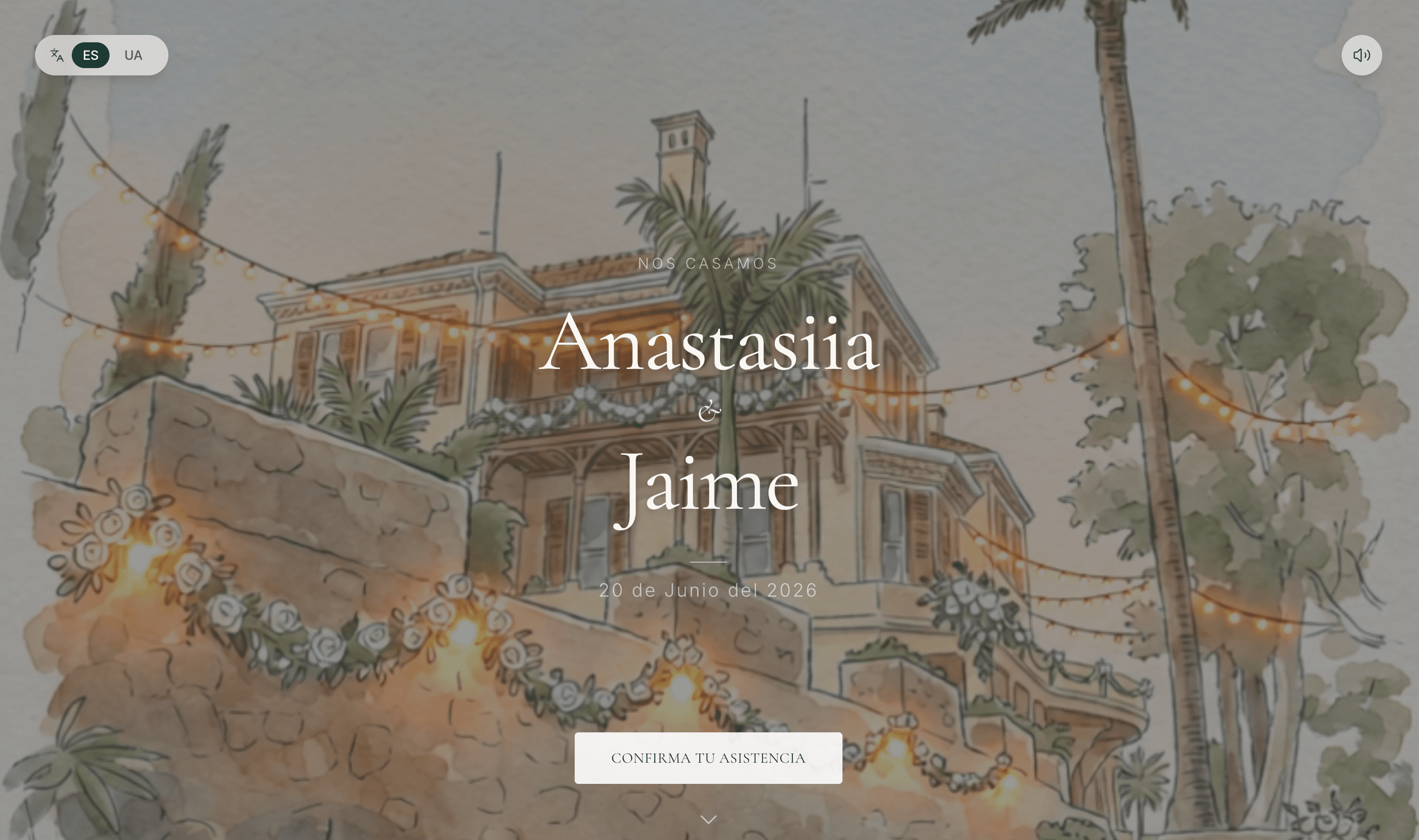
Names, date and venues should appear clearly near the top. Guests often open the link from a message and decide in a few seconds whether they have the right event.
Essential details to confirm before publishing
- Couple names, spelled as you want guests to see them
- Wedding date, including the year
- Ceremony venue name and address
- Reception venue name and address, if different
- Start times for ceremony and reception
- RSVP deadline
Add the details guests actually use
Once the essentials are clear, add the sections that stop guests from asking the same questions in private messages.
These are the highest-value extras for most weddings:
- A short welcome note that sets the tone
- A simple schedule or day-of timeline
- Location details with a map or navigation link
- Dress code, written in plain language
A schedule does not need every internal cue. Guests need arrival time, ceremony, cocktail, dinner and any later event they are invited to. If the after-party is only for some people, say so clearly or leave it off the public invitation.
Dress code works better as a short explanation than a single word. “Garden formal — linen and light layers, jackets optional after dinner” helps more than “cocktail”.
Practical information that reduces messages
This is where digital invitations earn their space. Paper cards rarely have room for hotels, parking or gift notes. A digital invitation can hold them without crowding the first screen.
Include these when they apply:
- Accommodation — hotel names, areas and booking notes
- Travel and parking — airports, trains, taxis or venue parking
- Gifts — registry, contribution link, or a clear “your presence is enough” note
- FAQs — children, plus-ones, weather, transfers, timing
Write FAQs from the questions you are already answering. If three people have asked whether children are invited, that belongs on the invitation. If nobody has asked about a colour palette, it does not.
RSVP questions that save the seating plan
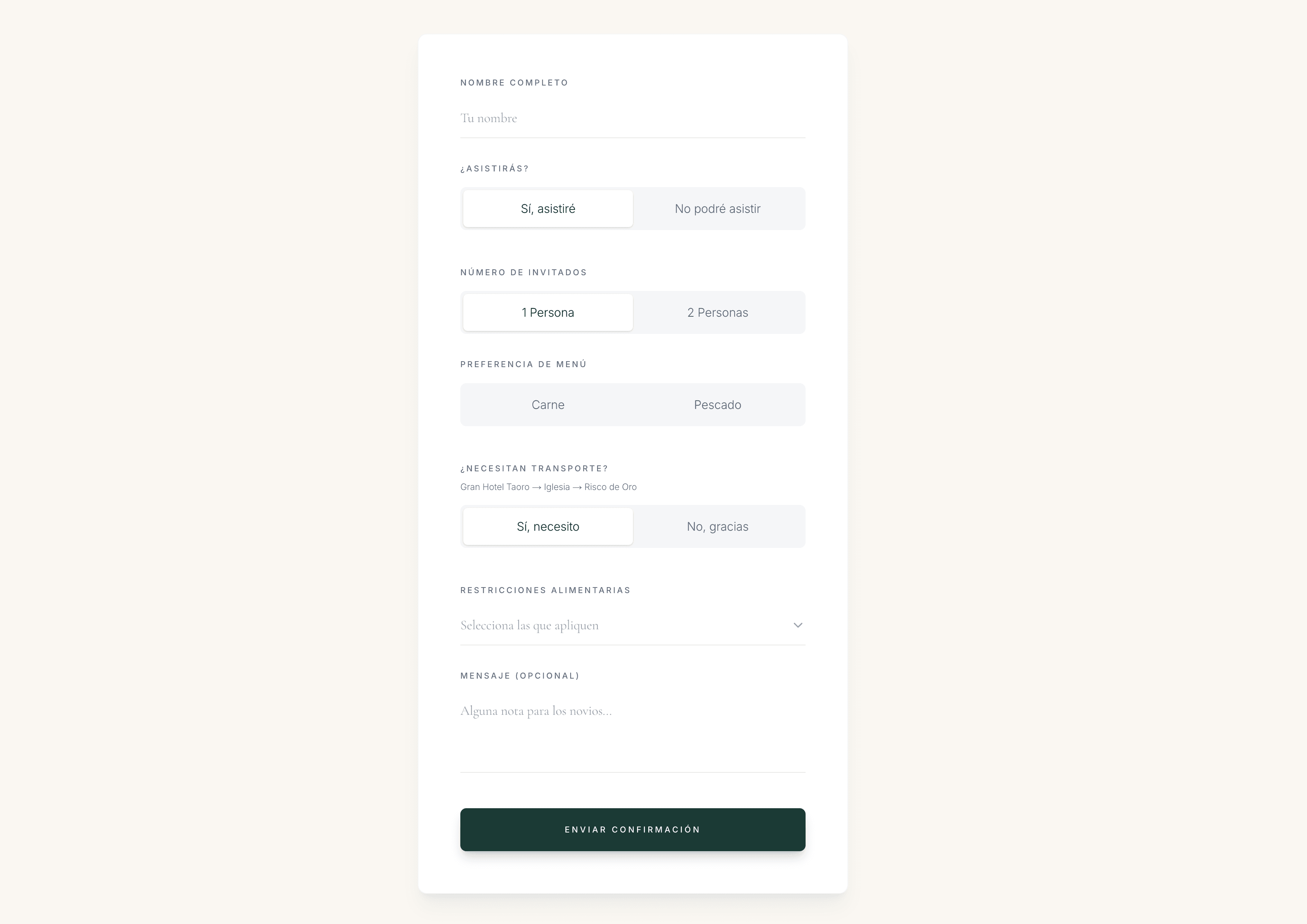
The invitation is also a data-collection tool. The questions you ask here decide how clean the guest list is when seating starts.
Ask for:
- Attendance — yes or no, per guest
- Plus-one, only if one is offered
- Meal choice, once the menu is decided
- Dietary restrictions
- A contact email or phone number
- One custom question if you truly need it — transport, song request, arrival day
Do not turn the RSVP into a survey. Every extra field lowers completion. If a question will not change catering, transport or seating, it can wait or live in the FAQs.
Structured answers matter more than a long message box. “Attending / not attending / meal / allergies” can later sit on the same guest record you use to assign tables. A WhatsApp reply of “we’re coming, details later” cannot.
RSVP fields worth including
- Attendance for each named guest
- Plus-one only when the invitation allows one
- Meal options, if catering needs them
- Dietary restrictions or allergies
- Email or phone for follow-up
- A single custom question if it changes logistics
- A visible RSVP deadline
What you can leave off the first version
A digital invitation can be published before every detail is finished. That is one of its advantages over paper. Guests need the essentials and a way to reply; the rest can arrive as you confirm it.
Safe to add later:
- Final dinner time, if the ceremony time is already clear
- Hotel room blocks, once they are booked
- A more detailed weekend schedule
- Music, countdown or extra photography
- A second language
- A custom domain
- Extra custom sections that are nice but not operational
Do not publish placeholder information that might be wrong. An approximate reception time is useful. A hotel that is still “TBC” creates more messages than it prevents. Leave the section off until the answer is real.
Local wedding vs destination weekend
The checklist changes with how far guests are travelling. A local Saturday wedding can stay short. A destination weekend needs more operational detail because guests are planning flights, hotels and extra days.
What to include by wedding type
| Comparison | Local wedding | Destination weekend |
|---|---|---|
| Must have | Names, date, venues, times, RSVP | Names, date, venues, times, RSVP, plus travel and stay notes |
| Schedule | Ceremony, cocktail, dinner | Arrival day, welcome event, ceremony day, any farewell brunch |
| Location | Addresses and a map link | Addresses, map links, airport or transfer notes |
| Accommodation | Optional unless guests are coming from out of town | Recommended: hotels, areas and booking windows |
| FAQs | Children, parking, gifts, timing | Children, transfers, weather, dress for heat or terrain, plus-ones |
| RSVP extras | Meals and dietary needs | Meals, dietary needs, arrival day or transport if you are arranging it |
What to leave off entirely
More content is not automatically more helpful. Leave these out of the guest-facing invitation:
- Internal planning notes, vendor contacts or budget details
- Unconfirmed times presented as final
- The same information repeated in four different sections
- A long gift explanation when one clear sentence would do
- Events that only some guests are invited to, unless the invitation is private to that group
- Questions that will not change catering, seating or logistics
If a section does not help a guest decide, arrive or reply, it is decoration. Decoration can wait.
The complete checklist
Use this as a publishing gate. If the must-have list is complete, you can send the link. Everything else improves the guest experience or the later seating work.
Must have before you send
- Couple names
- Date
- Ceremony venue and time
- Reception venue and time, if different
- A way to RSVP
- RSVP deadline
Should have for most weddings
- Short welcome
- Day-of schedule
- Map or navigation link
- Dress code in plain language
- Attendance, meal and dietary RSVP fields
- Gift note, if guests will ask
Add when they apply
- Accommodation
- Travel or parking
- FAQs from real guest questions
- Plus-one question, only if offered
- Custom RSVP question for transport or arrival
- Second language for destination guests
After guests RSVP, keep using the same list
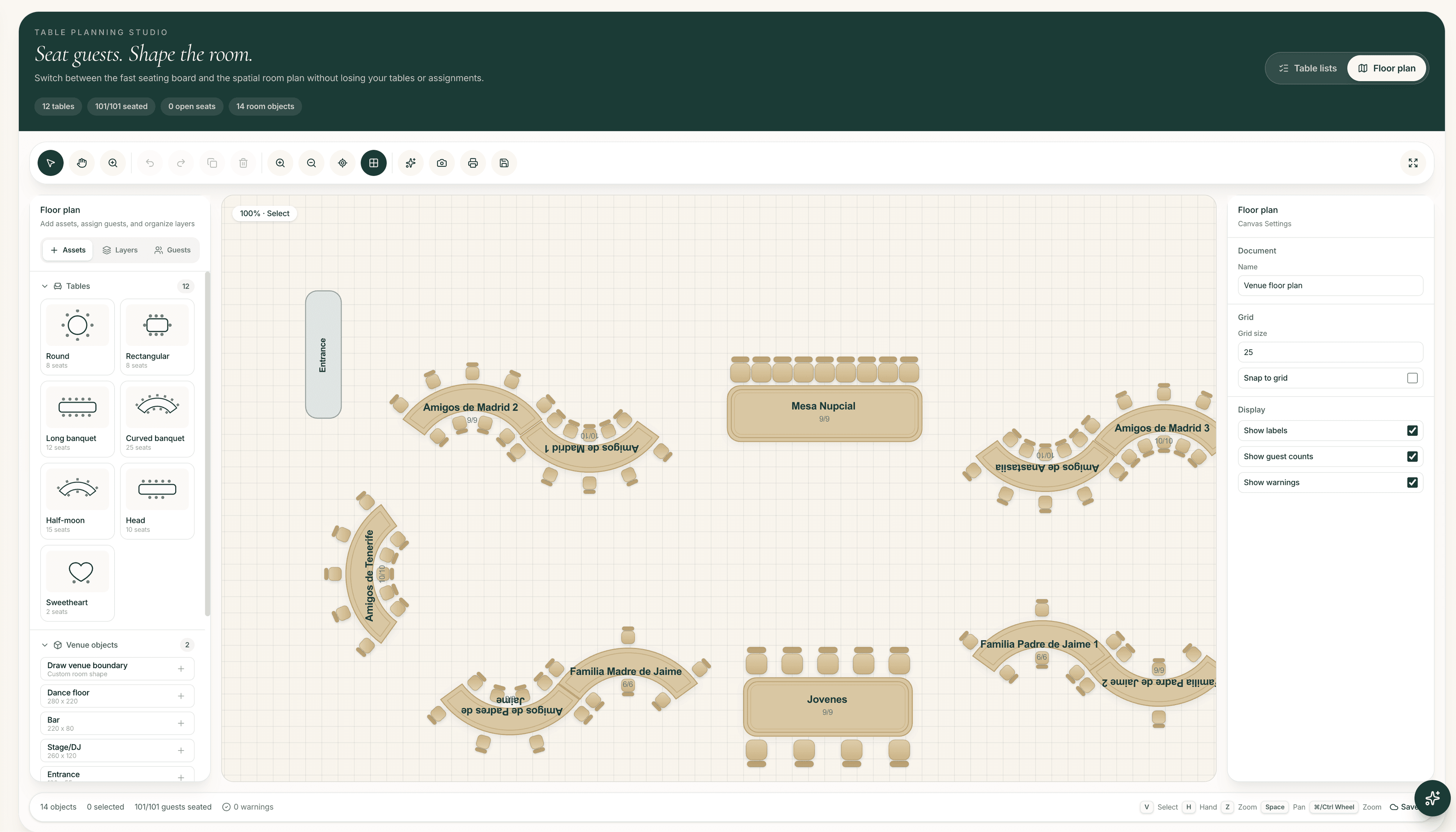
The hidden value of a complete digital invitation is not only a prettier first impression. It is a cleaner guest directory.
When attendance, meals and plus-ones are collected as structured answers, you do not need to rebuild the list before seating. Confirmed guests, dietary notes and party groups can stay attached to the same people you later place at tables.
That is why the RSVP section belongs on this checklist as much as the date and venue. The invitation is the start of the guest list, not a separate artefact you abandon after people reply.
Frequently asked questions
What is the minimum a digital wedding invitation should include?
Names, date, ceremony and reception details, and a way to RSVP by a clear deadline. If those five things are missing, guests will message you instead of using the invitation.
Do I need a wedding website and a digital invitation?
Not if the invitation already holds the schedule, location, practical notes and RSVP. A digital invitation can be the guest hub. A separate website only helps if you want a second, more public page.
Should I include a gift registry?
Include a short, clear note if guests will ask. One sentence plus a link is enough. A long explanation of your philosophy usually creates more confusion than it prevents.
How many RSVP questions is too many?
If a question will not change catering, transport or seating, leave it off. Attendance, plus-one when offered, meal choice and dietary needs cover most weddings. Add one custom field only when it changes logistics.
Can I add sections after the invitation is published?
Yes. That is one reason digital invitations are easier than paper. Publish the essentials first, then add accommodation, a fuller schedule or FAQs once those details are confirmed.
Do local weddings need accommodation and travel sections?
Only if a meaningful number of guests are coming from out of town. For a mostly local guest list, addresses, parking and a clear schedule usually matter more than hotel blocks.
Continue reading
Related stories

How to Create a Digital Wedding Invitation in 10 Minutes
Create a professionally designed digital wedding invitation in minutes, collect RSVPs and keep using the same guest list when it is time to organise the seating plan.

Digital vs Paper Wedding Invitations: Cost, RSVP Rate and Seating Impact
Compare digital and paper wedding invitations on real cost, how fast guests RSVP, and what that choice means for your seating plan later.

Best Digital Wedding Invitations in 2026–2027
Compare the best digital wedding invitation options for 2026–2027, including design quality, mobile experience, RSVP management, bilingual support and the tools available after guests respond.