Guía
Wedding RSVP Questions: 20 Examples You Can Copy
Copy 20 clear wedding RSVP questions for attendance, plus-ones, meals, allergies, transport, accessibility and weekend events.
Every question should earn its place
An online RSVP can collect far more than a paper reply card. That does not mean it should. The best form is short enough to finish on a phone and specific enough to give your caterer, venue and planner usable answers.
Use the 20 examples below as a menu, not a mandatory questionnaire. Most weddings need five to seven questions. Destination weekends and weddings with transport may need a few more.
The five questions almost every wedding needs
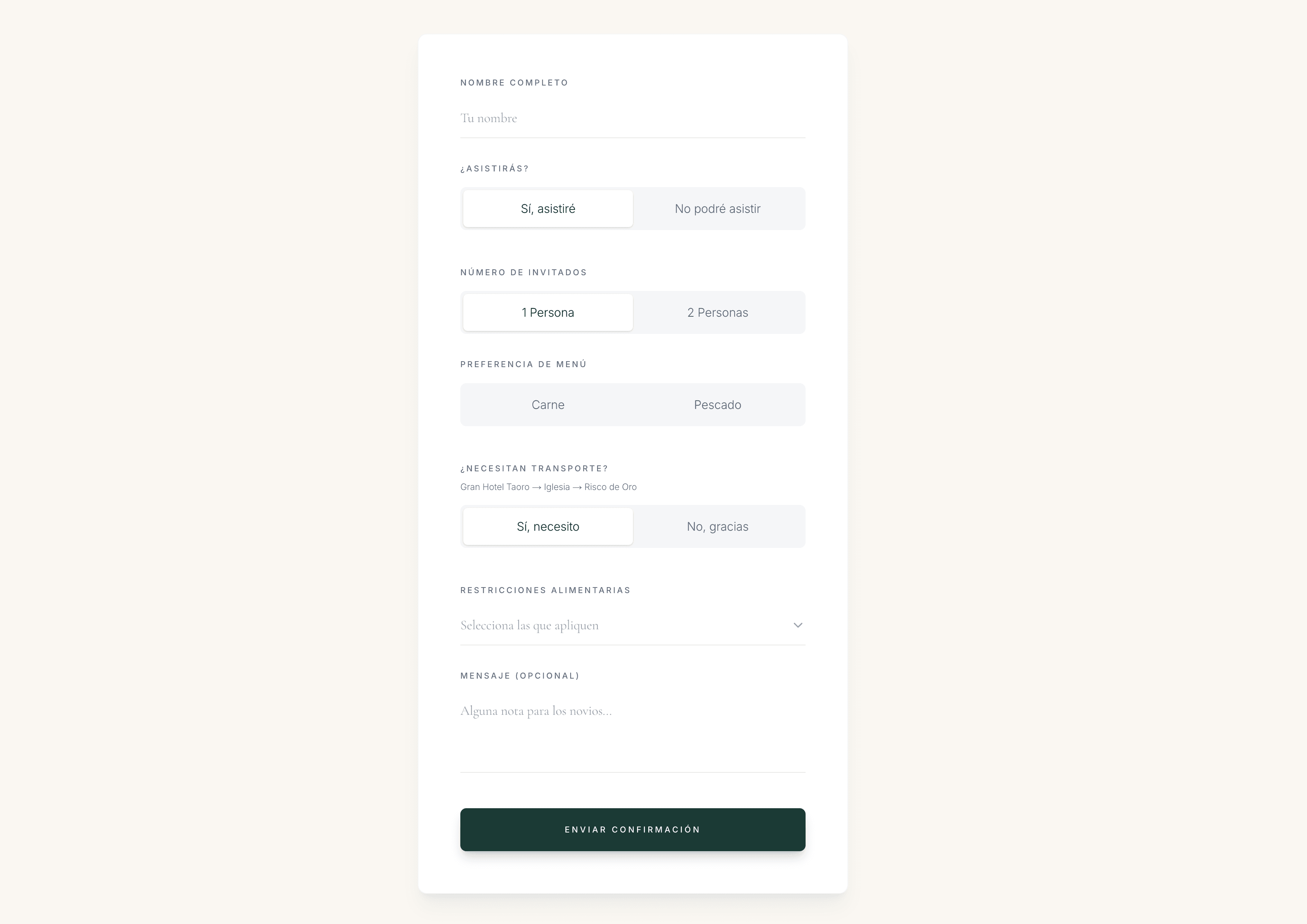
Start with identity and attendance. Then ask only for information you must count or act on. Keep each answer attached to the right person, especially when a couple or household replies together.
1. Will you be attending our wedding on [date]?
Use two unambiguous answers: “Joyfully accepts” and “Regretfully declines”, or simply “Yes” and “No”. Do not add “Maybe” unless you have a plan and deadline for resolving it.
2. What is your full name?
Ask for the name you need on the guest list and place card. A personal invitation link is even cleaner because the response starts from a known guest.
3. Which invited guests in your party will attend?
Use named invitees where possible. “How many are coming?” can accidentally make the invitation feel open to extra guests.
4. What is the best email address or phone number for wedding updates?
Choose the channel you will actually use. Asking for both is useful only when you genuinely plan to send updates in both places.
5. Please reply by [date].
The deadline is an instruction rather than a question, but it belongs beside the form. Set it before the caterer and venue need final numbers so you have time to follow up.
Plus-one and household questions
The RSVP should enforce the invitation you already sent. If a guest has a plus-one, say so clearly. If they do not, avoid a blank “number attending” field that suggests they can add someone.
6. Will your invited guest be joining you?
Show this only to guests whose invitation includes a plus-one.
7. What is your guest’s full name?
A named person can receive a meal, dietary note, seat and place card. “Plus one” cannot.
8. Which children named on your invitation will attend?
Ask only when children are invited. If ages affect high chairs, childcare or children’s meals, ask for age separately and explain why.
Wording that prevents awkward assumptions
- Name every invited adult where possible
- Show a plus-one option only when one is included
- Do not ask guests to negotiate extra places inside the RSVP
- Keep household attendance attached to individual names
Meal and dietary questions
Ask for an entrée only if the caterer requires advance choices. Buffet and family-style meals usually need dietary information, not a pretend menu vote.
9. Please choose one main course for each attending guest.
Use a select field with the exact caterer-approved options, such as beef, fish and vegetarian. Apply the question to each guest rather than the whole party.
10. Do you have any food allergies or dietary requirements?
Keep this separate from the entrée choice. Include the guest’s name and enough detail for the caterer, especially for severe allergies.
11. Does any attending child need a children’s meal?
Ask only if the caterer offers one and children are invited.
Use the right answer type
| Comparison | Best field | Why |
|---|---|---|
| Attendance | Yes / no choice | Fast and impossible to misread |
| Meal selection | Select with fixed options | Produces reliable catering totals |
| Allergies and dietary needs | Short or long text | Captures detail a checkbox list can miss |
| Transport or extra event | Yes / no or select | Gives a clean headcount |
| Message or song | Optional text | Leaves room for personality without blocking submission |
Transport, accessibility and weekend events
Logistics questions are valuable when the answer changes a booking. If you are not reserving a bus, counting brunch seats or planning access, put the information on the invitation instead of asking about it.
12. Will you use the shuttle from [pickup point] at [time]?
Name the route and time. A vague “Do you need transport?” produces answers you cannot turn into a bus count.
13. Do you have any accessibility requirements we should plan for?
Use an optional text field and follow up privately. This can cover step-free access, seating, hearing, vision or other practical needs.
14. Will you attend the welcome dinner on [date]?
Ask a separate yes/no question for each event that needs its own headcount.
15. Will you attend the farewell brunch on [date]?
Include time and place if the guest must decide before opening another section.
16. Where will you be staying during the wedding weekend?
Ask only if the answer affects transport or emergency planning. Do not request booking references or travel details you will never use.
Optional questions that add personality
Put optional questions last. They should feel like a small pleasure after the practical work, not a test guests must pass to confirm.
17. What song will get you onto the dance floor?
Useful if you will share the answers with the DJ or band. Otherwise it is data you have asked guests to create and then ignored.
18. Leave us a note or piece of marriage advice.
Keep it optional. It can produce lovely messages, but it should never stand between a guest and the submit button.
19. What is one local activity you would love to join?
Suitable for a destination weekend only when you are genuinely choosing between group plans.
20. Do you need help with anything before the day?
Use sparingly and give examples, such as mobility, language or arrival support, so the answers stay practical.
Questions to leave off the RSVP
Remove a question when the answer changes nothing
- Dress-code quizzes when the invitation can state the dress code
- Detailed flight numbers unless you are coordinating transfers
- Registry preferences
- Open requests to bring extra guests or children
- Several versions of the same dietary question
- Long surveys about the couple
- Anything the venue or caterer has not agreed to provide
A useful test is: who receives this answer, and what will they do with it? If there is no clear owner or action, remove the field.
How to arrange the form
A guest-friendly order
- 01
Identify the guest
Start from a personal link or ask for the full name. Keep the invited party clear.
- 02
Confirm attendance
Put yes or no before meals, travel and entertainment questions.
- 03
Collect per-person details
Ask each attending guest for any meal choice or dietary requirement that applies to them.
- 04
Count logistics
Add shuttle and weekend-event questions only where you need a number.
- 05
Finish with one optional prompt
A song request or note is enough. Then make the submit button obvious.
Test before sending
- The form works on a phone
- A solo invitation does not offer a plus-one
- Each guest can have their own meal or custom answer
- The RSVP deadline is visible
- Required fields are truly required
- Answers appear in a guest list you can use later
Copy-and-paste short form
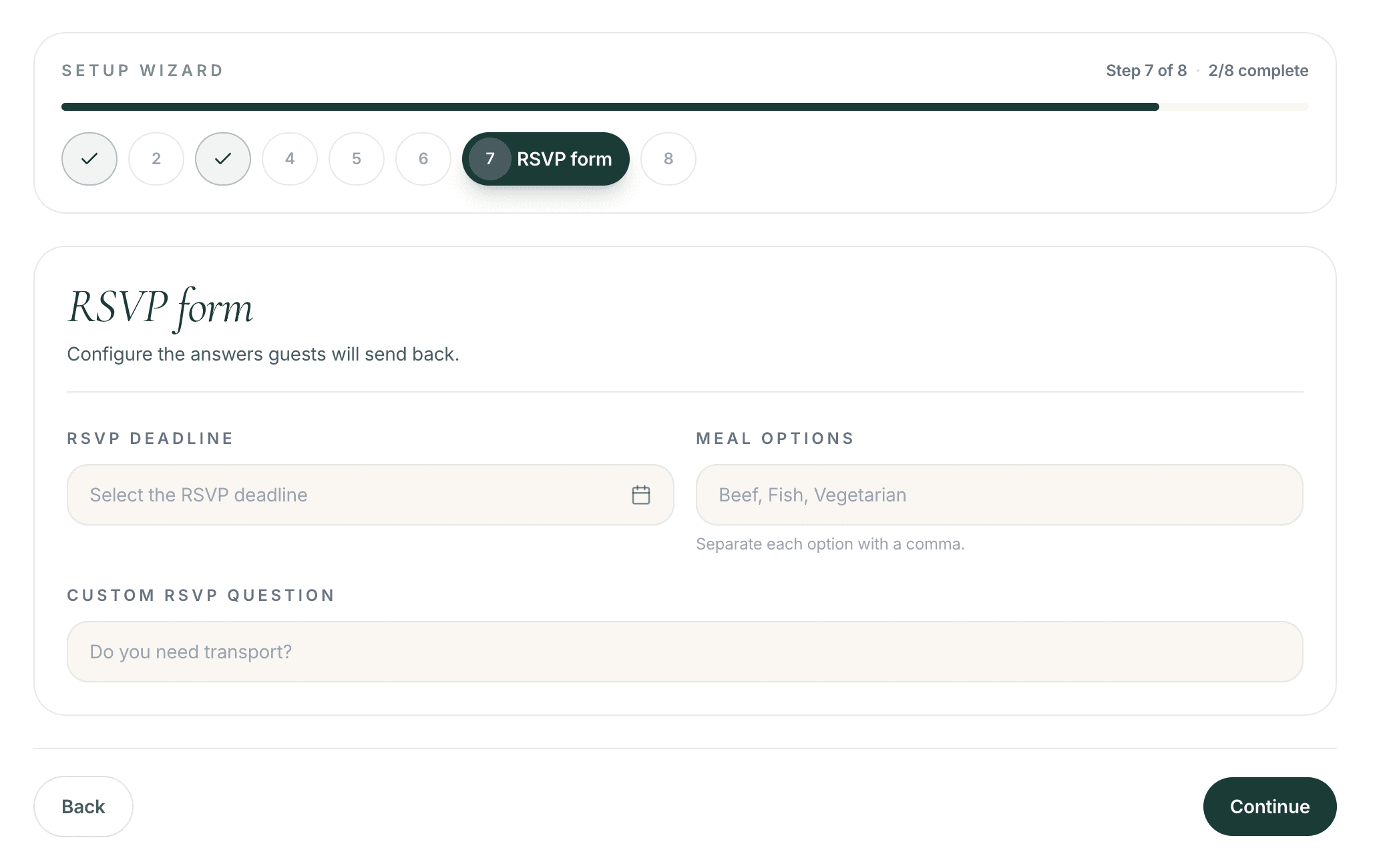
For a typical plated wedding, this six-part version is enough:
- What is your full name?
- Will you attend our wedding on [date]? Yes / No
- Will your invited guest attend? If yes, please add their full name.
- Please choose one main course for each attending guest: [options].
- Please share any allergies or dietary requirements for each guest.
- Optional: What song will get you onto the dance floor?
Add a visible reply deadline, test the flow as both a solo guest and a couple, and remove any question whose answer you will not use.
Preguntas frecuentes
What questions should be on a wedding RSVP?
Most weddings need the guest’s name, attendance, named plus-one if invited, meal choice if the caterer requires one, dietary requirements and a contact method. Add transport or extra-event questions only when you need a headcount.
How many questions should a wedding RSVP have?
Aim for five to seven. A destination weekend may need separate welcome-dinner, brunch or shuttle questions, but every extra field should support a real decision.
How should I ask about dietary restrictions?
Ask “Do you have any food allergies or dietary requirements?” and collect the answer for each attending guest. Keep it separate from the fixed entrée selection.
How do I ask about a plus-one?
Only show the question to someone whose invitation includes a guest. Ask whether the invited guest will attend, then request their full name and any per-person meal or dietary information.
Should I ask for a song request?
Yes, if you will send the answers to the DJ or band. Keep it optional and place it after attendance, catering and logistics.
When should the RSVP deadline be?
Work backwards from the caterer and venue deadlines, then leave time to follow up with non-responders and resolve meal or accessibility details before final numbers are due.
Can The Wedy ask a question for each guest?
Yes. Custom RSVP questions can apply to the whole party or to each guest. Available answer types include text, long text, select and checkbox, and a question can be marked required.
Sigue leyendo
Historias relacionadas
How to Collect Wedding RSVPs Online Without Spreadsheets or Group Chats
Collect wedding RSVPs in one place instead of WhatsApp threads and spreadsheets, with structured replies that later become your seating plan.

What to Include in a Digital Wedding Invitation
A practical checklist of what guests need on a digital wedding invitation — the essentials, useful extras, RSVP questions and what you can add later.

Can You Use Your RSVP Guest List to Create the Wedding Seating Plan?
Turn confirmed wedding RSVPs into an organised seating plan without copying guest information between spreadsheets and separate tools.