Guide
How to Create a Wedding Seating Plan Online Without Losing Your Mind
Creating a wedding seating plan doesn’t have to mean endless spreadsheets, sticky notes and last-minute table changes. Here’s a simpler way to organise your guests and build a seating plan online.
The seating plan is where calm planning often turns chaotic
Most couples do not struggle because they cannot draw a table. They struggle because guest information lives in one place, family politics live in their heads, and the actual seating chart lives in a spreadsheet that breaks every time someone cancels.
Creating a wedding seating plan online works when the guest list, relationships, table layout and wedding-day lookup stay connected. That is what The Wedy is built for: one guest directory that feeds the seating canvas, floor plan and QR table lookup — without copying names between tools.
This guide walks through a practical sequence: gather confirmed guests, organise groups, set seating rules, build the plan online, handle changes and share the final arrangement with guests.
Why spreadsheets and sticky notes fall apart
Paper charts and shared sheets feel flexible at first. Then the real wedding starts happening.
Typical friction points:
- Confirmed guests live in the invitation tool, not the seating file
- Plus-ones and meal choices arrive after the first chart is built
- Family dynamics are hard to encode in columns
- One cancellation forces a cascade of table edits
- Nobody knows which version is the latest
- The venue layout is separate from who sits where
An online seating plan only helps if it solves those handoffs — not if it becomes another disconnected chart.
What “creating a seating plan online” should actually mean
A useful online seating workflow is more than dragging circles on a blank page. It should keep the social logic and the practical logistics in one place.
Look for a system that lets you:
- Work from confirmed guest records, not a copied name list
- Group families, friendship circles and couples
- Record who must sit together and who must stay apart
- Assign guests to tables visually
- Place tables on a real venue floor plan
- Update the plan when RSVPs change
- Help guests find their table on the day
The Wedy connects invitations, RSVPs, guest relationships, seating and floor planning in one planning suite, so the seating plan is an extension of the guest list rather than a second project.
Prepare before you open the seating canvas
You do not need every RSVP locked before you begin. You do need enough structure that the first draft is not guesswork.
Have these ready
- A working guest list with confirmed and pending guests
- Rough headcount and expected table sizes
- Known couples and family units
- Sensitive placements (divorced parents, VIPs, guests who should not meet)
- Accessibility needs and quieter seating preferences
- Venue constraints: entrances, dance floor, pillars, stage, service routes
- A first idea of top table or sweetheart table style
If guests are still RSVPing through The Wedy invitation, their attendance and meal details already sit in the guest directory. That means seating starts from live guest records instead of an export.
Step 1: Get every guest into one organised list
Start with a single source of truth. In The Wedy, that is the guest directory: confirmed guests, pending replies, declined invitations, plus-ones, meals and notes stay attached to each person.
Before assigning seats, clean the basics:
- Mark attendance clearly: confirmed, pending or declined
- Attach plus-ones to the right guest
- Keep meal and dietary information with the guest record
- Note accessibility or language needs that affect placement
- Remove duplicates and placeholder names
If your invitations and RSVPs already live in The Wedy, this step is mostly a review. If guests are coming from elsewhere, import or add them once — then stop maintaining a parallel sheet.
Step 2: Organise groups before you assign tables
Tables become easier when people are already clustered into meaningful groups. Do this before you open the seating canvas.
Useful groups include:
- Partner’s family
- Your family
- University friends
- Work colleagues
- Childhood friends
- Wedding party
- Guests attending alone who need a base group
Grouping first prevents the common mistake of filling tables by name order and then discovering that people who know each other are scattered across the room.
Step 3: Capture family dynamics as seating rules
This is the step spreadsheets usually skip — and the reason seating feels stressful. Turn social judgement into explicit rules before you drag names onto tables.
Record rules such as:
- Partners must sit together
- Close family should share a table or sit nearby
- Certain relatives must not sit together
- Children should stay with parents or at a kids’ table
- Older guests may prefer quieter seating
- Guests with reduced mobility need accessible routes
- Solo guests should land with a compatible group
In The Wedy, relationship and seating requirements stay attached to the guests. When the plan changes later, those constraints are still there — you are not relying on memory or a side note in a sheet.
Step 4: Create tables and assign guests online
Now open the seating canvas. Create the tables you need, set capacities and start placing groups rather than individuals one by one.
A calm assignment order:
- Place the top table or sweetheart table first
- Seat close family and VIP tables
- Place large friendship or family groups
- Fill remaining seats with smaller clusters
- Integrate solo guests into compatible tables
- Check capacities, empty seats and awkward leftovers
In The Wedy you can drag guests between tables visually, so adjustments stay tactile instead of becoming a formula nightmare in a spreadsheet.

Step 5: Use AI for a first draft — then take control
A blank seating chart is intimidating. AI-assisted seating in The Wedy can propose a starting arrangement from groups, relationships and constraints.
Treat that suggestion as a draft. Review sensitive placements yourself, adjust anything that feels socially off and keep the final call with you or your planner.
The point is speed to a workable first version — not handing the wedding over to automation.
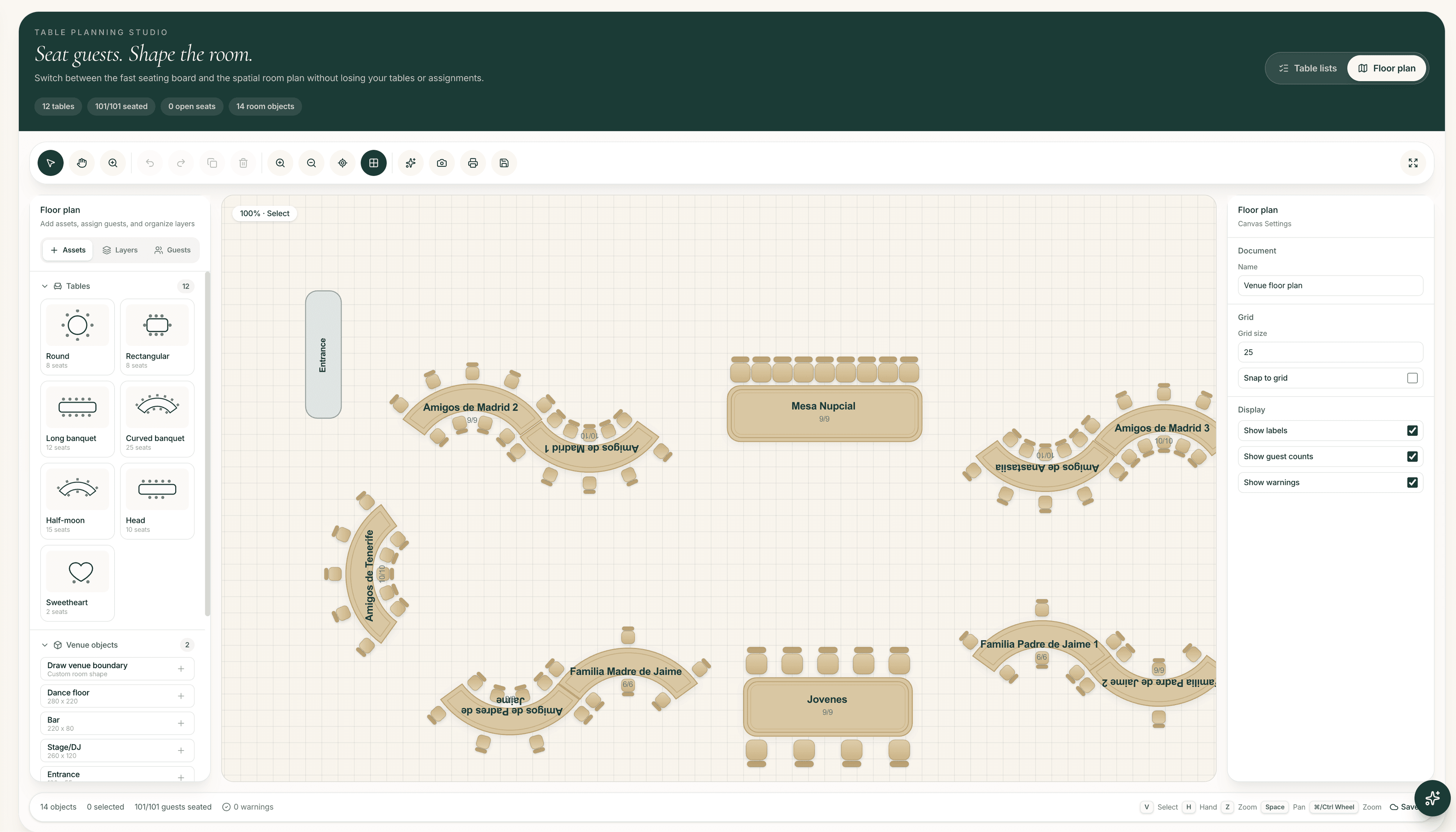
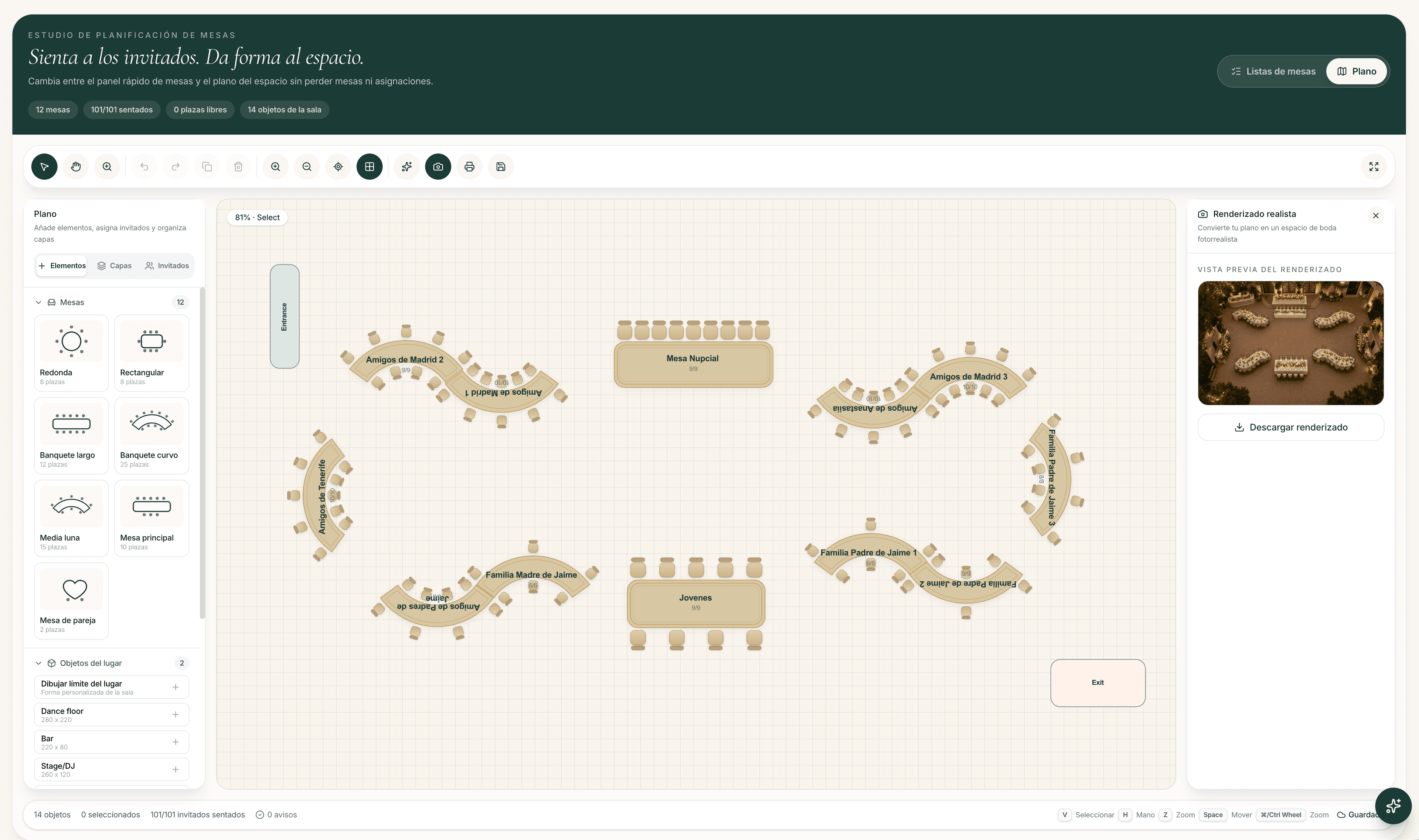
Step 6: Connect tables to the venue floor plan
Who sits with whom is only half the plan. Where those tables sit in the room affects conversation, access, noise and service.
Use the floor plan to place:
- Tables and capacities
- Entrances and exits
- Dance floor
- Bar or drinks stations
- Stage or DJ area
- Service paths and obstructed zones
In The Wedy, floor-plan tables can connect to the actual guest seating arrangement. That keeps the social plan and the physical layout from drifting into two unrelated diagrams.
Step 7: Handle last-minute changes without rebuilding everything
Expect changes. The goal is a seating system that absorbs them.
Common updates:
- A guest cancels
- A plus-one is confirmed late
- Meal choices change
- Two groups need to swap tables
- A table capacity shifts after a venue walkthrough
Because The Wedy keeps RSVPs, guest records and seating connected, you update the person once and adjust the table plan from the same workspace. You are not re-exporting, re-cleaning and re-pasting a sheet the week of the wedding.
Step 8: Publish a wedding-day seating lookup
Once seats are assigned, guests still need a simple way to find their table. Printed charts work until the last change arrives.
With The Wedy QR seating lookup:
- Publish the public seating lookup
- Display the QR code at the venue
- Guests search their name
- Their table appears instantly
- Late edits do not require reprinting the whole chart
That closes the loop: plan online, update until the final hours, and still give guests a clear answer on the day.
A practical timeline that keeps you sane
Do not wait until the final week, and do not finalise every seat while half the guest list is still pending.
Suggested seating timeline
- Before RSVPs close: organise families, friendship groups and known conflicts
- When most replies are in: create tables and a first online seating draft
- Two to four weeks before: confirm assignments and place tables on the floor plan
- Final week: absorb cancellations and plus-ones without rebuilding from scratch
- Wedding day: share the QR seating lookup and keep one person able to make last edits
Common mistakes to avoid
- Building the chart before groups and conflicts are written down
- Keeping RSVPs in one tool and seating in another
- Filling tables by leftover names instead of by social clusters
- Ignoring venue layout until the chart is “finished”
- Treating AI output as final without a human review
- Printing the seating chart too early
Avoid those, and creating a wedding seating plan online becomes a sequence of clear decisions instead of a recurring weekend crisis.
Why couples choose The Wedy for seating
The Wedy is built for weddings where the hard part is not drawing tables — it is managing people, relationships and late changes in one place.
- Guest directory connected to invitations and RSVPs
- Relationship-aware seating rules
- Drag-and-drop table assignments
- AI-assisted first drafts you can edit
- Venue floor plans linked to seating
- Public QR table lookup for guests
- Planning Suite support for up to 300 guests
If you want the seating plan to stay calm from the first draft to the reception entrance, start with the same workspace that already holds your guests.
Frequently asked questions
How do you create a wedding seating plan online?
Start with a complete guest list, organise families and friendship groups, record who must sit together or apart, create tables, assign guests visually, place tables on the venue floor plan and keep the plan updateable until the wedding day.
When should we start the wedding seating plan?
Organise groups and sensitive dynamics before RSVPs close. Build the first online draft once most guests have replied, then confirm tables two to four weeks before the wedding while leaving room for final changes.
Can The Wedy replace a seating spreadsheet?
Yes for most couples. Confirmed guests, relationships, table assignments and floor-plan layout stay in one workspace, so you do not need to copy names between invitation replies and a separate seating sheet.
How do you handle complicated family dynamics?
Write them down as seating rules before assigning tables: partners together, conflicts apart, accessibility needs, quieter seating and compatible groups for solo guests. The Wedy keeps those constraints attached to the guest records.
Is AI enough to finish a wedding seating plan?
No. AI can draft a useful first arrangement from relationships and constraints, but couples or planners should always review sensitive placements before the plan is final.
How do guests find their table on the wedding day?
With The Wedy, you can publish a public seating lookup. Guests scan a QR code, search their name and see their assigned table — even if last-minute edits were made after printing would have been practical.